Showing posts with label problem. Show all posts
Showing posts with label problem. Show all posts
Wednesday, December 28, 2016
Problem pada Layar Laptop
Problem pada Layar Laptop


Awalnya karena saya bingung mau ngelakuin apa. setelah bowsing² ternyata saya mendapatkan beberaa informasi baru..........!!!
yaitu bagaimana cara memperbaiki Layar Laptop dalam hal ini layarnya "jleret²"Seperti gambar di atas.
Maka dari browsing yang saya dapat, kita dapat mengatasinya dengan mudah.
- Pertama kita harus memilki keyakinan untuk dapat memperbaiki Laptop kesayangan kita.
- Selanjutnya, bongkar Laptop(hati-hati jangan sampai lupa letak-letak dari bagian-bagianya. saya anjurkan untuk menulis letak semua komponennya agar tidak keliru)
- Lalu Check apakah VGA dan RAM-nya. Apakah Telah tertancap dengan baik pada Slotnya.
- FInally, jika sudah maka kembalikan lagi ke bentuk asalnya.. heheh....!!
selesailah sudah .. langsung aja dicoba dinyalain lagi.....!!!
semoga berhasil....!!!
Kesimpulan :
kesimpulannya adalah jika kta menemukan kondisi Laptop seperti yang saya bahas, maka langkah pertama yang harus dilakkan adalah Chek apakah VGA dan RAM telah tertancap dengan baik itu saja
Semoga yang saya berikan bermanfaat untuk Anda sekalian !!
Available link for download

Sunday, November 20, 2016
Resolve Problem After Resetting Canon Pixma iP1700
Resolve Problem After Resetting Canon Pixma iP1700
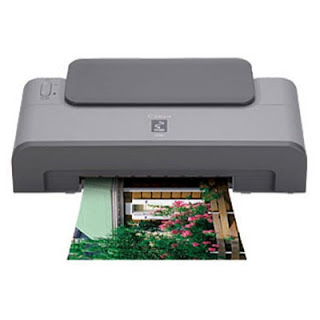 After a few day expreiment with my canon Pixma iP1700, I find two problem often happened when resetting the printer. First case, My Canon pixma Pixma ip1700 becoming Canon Pixma ip1300 after resetting the eeprom, second case, cartridge not recognize after resetting the counter then the led blinking 5X orange and 1X green..
My Canon pixma ip1700 becoming ip1300 My Canon Pixma iP1700 becoming canon Pixma iP1300, this problem happened after resetting the eeprom of Canon iP1700 using iPtool. The solutions for this problem :
Install driver for canon iP1300, you can download the driver in the canon website. Now run iPtool software, auto recognize as Canon Pixma iP1300 In the change model set the printer to iP1700. In the EEPROM Operations click reset button. Turn off the printer and turn on again, the problem solved now your Canon printer becoming Canon Pixma iP 1700 again. 2. Blinking orange 5x and green 1x and the color/black cartridge not recognized

This problem appear after several times reset ink level the cartridge. If this reset methode does not work to solve the problem. I get this solution after several times try resetting using various combinations button. Solutions for the problem are :
Start with printer Hold down Resume button and press Power button. Keep holding down Power button and press Resume 2 times, then press and hold the resume button, release power button. Green lights will flash and then stop blinking (Keep hold the resume button). When green lights are solid, release resume button and press again the Resume button 4 times. Don’t switch of the printer (because if your trun off and turn on again the printer the problem still appear), Now reset the counter and EEPROM canon iP1700 using iPTool software (recommended). Turn off and turn on again the printer, the printer should respond as normal. In my Canon iP1700 problem solved.KTZZTQEN28PN
Available link for download
Monday, October 3, 2016
Slight the problem
Slight the problem
The strongest power of us is power to slight the problem
But you focus on your strategy
Agus Rahmat A.
But you focus on your strategy
Agus Rahmat A.
Available link for download
Subscribe to:
Posts (Atom)