Showing posts with label 2770. Show all posts
Showing posts with label 2770. Show all posts
Thursday, January 12, 2017
Service mode Canon pixma 2770
Service mode Canon pixma 2770

Before doing Resett ,Printer must be Ready (Service mode) , How to service mode;
- Turn off Printer ( POWER + USB cable attached).
- Press and hold RESUME button? .
- Press and hold POWER button then free RESUME button But hold POWER button .
- Press RESUME button five times (5x). not 4xprinter will turn off, but temporary.
- Free both of button , the lamp indicator will ready in green /ready (printer will Found new hardware = canon device) Annoy it
- Service tool v_1074.exe
- Pairs of paper in the printer.
- Find CLEAR INK COUNTER colom then click MAIN .
- Printer will print
- Turn off printer.
- Turn on printer .
- Printer is ready for use.
Reset Canon iP2770 error 5200
1. Turn the printer, and printer will look normal.
2. Run the printer for printing documents or print test, then the 5200 error will appear.
3. Jump unplug the power cord without pressing the on-off
4. Open it and slide it into the middle catridgenya manually (press the white penguncinya hook behind the head, for cartridge can be pulled into the middle)
5. Unplug all cartridges and leave the lid remains open
6. Turn the printer, hit the head will move left and right because the lid was still open and will stop in the middle.
7. Replace the cartridge, and close the correct
8. Your printer will return to normal
Download PROGRAM RESETTER CANON IP 2770 V1074
Available link for download

Tuesday, December 27, 2016
Reset Canon IP 2770 dengan windows 7
Reset Canon IP 2770 dengan windows 7

Siapa yang tidak mengenal printer yang satu ini, menurut saya ini adalah printer yang sangat laris dipasaran saat ini, dikarenakan harga yang terjangkau, tapi dibalik itu printer ini mempunyai banyak masalah yang menghantuainya,di antaranya kita harus mereset printer ini jika sudah mencapai batas poin yang sudah di tetapkan oleh parbrikan Canon. maka karena itu kita harus mereset ulang point-nya menjadi nol lagi. bagi anda yang ingin mengunduhnya anda dapat mendownloadnya Disini . atau VIA MEDIAFIRE
resetter ini dapat berjalan di windows XP vista serta windows 7 dan windows 8. kebanyakan resetter hanya berjalan di windows XP saja, dan para pengguna windows sering kesulitan untuk meresetnya, apalagi yang menggunakan windows 7 ke atas.
resetter ini dapat berjalan di windows XP vista serta windows 7 dan windows 8. kebanyakan resetter hanya berjalan di windows XP saja, dan para pengguna windows sering kesulitan untuk meresetnya, apalagi yang menggunakan windows 7 ke atas.
error yang muncul pada printer jika ingin direset adalah seperti gambar di bawah ini
.jpg)
Berikut ini adalah langkah langkahnya untuk mereset printer canon ip 2770
1. Persiapkan kertas minimal 2 lembar
2. Kabel power listrik dalam keadaan terpasang
3. Tekan tobol RESUME ( gambar segitiga di bawah tombol power pada printer ) dan tahan
4. Tekan tombol power
5. Lepaskan tombol RESUME ( Tombol power tetap ditahan )
6. Tekan kembali tombol RESUME sebanyak 5x
7. Lepaskan kedua Tombol Bersamaan ( Tombol Power dan RESUME )
8. Komputer akan mendeteksi Hardware baru dan di cancel saja
9. Setelah selesai mendownload buka program resetternya (gambar di bawah ini )

2. Pada Clear Ink Counter pilih Main dan klik SET ( gambar no 1)
dan printer akan mencetak dengna tulisan D 0.000
dan printer akan mencetak dengna tulisan D 0.000
3. langkah berikutnya klik no 2 (seperti gambar)
klik ok (tampilan finished)
4. Dan yang terkhir klik Eprom
printer akan mencetak kembali dengan tulisan yang lumayan banyak hehehehehehe
5. Matikan printer dan hidupkan kembali printer anda
6. Printer siap digunakan
Selamat mencoba dan salam sukses
klik ok (tampilan finished)
4. Dan yang terkhir klik Eprom
printer akan mencetak kembali dengan tulisan yang lumayan banyak hehehehehehe
5. Matikan printer dan hidupkan kembali printer anda
6. Printer siap digunakan
Selamat mencoba dan salam sukses
Available link for download
Saturday, December 17, 2016
printer canon ip 2770 258 287 237 tidak dapat direset
printer canon ip 2770 258 287 237 tidak dapat direset
Dari pengalaman saya sendiri beberapa waktu yang lalu mengalami kasus yaitu printer canon ip 2770 canon MP 258, MP 287...... tidak bisa di reset. jika di reset hanya loading terus dan tidak ada respon, sempat membuat saya kebingungan mencari solusinya. awalnya saya mengunakan resetter canon Versi.1074 tetapi tidak mau. kemusian saya coba menggunakan versi 2.0 juga tidak mau, saya berpendapat bahwa printernya yang tidak mau di reset albakal harus ganci IC epromnya, dan harganya juga lumayan mahal....

dari tampilan gambar di atas jika suda di klik main program resetternya cuma loading aja dan printer tidak mau mencetak, dan di tunggu ampe beberapa jam juga tetep tidak mau mencetak juga
waktu itu saya tidak sengaja mengetik kata resetter canon ip 2770 v3 dan ternyata keluar versi 3400... iseng iseng saya download dan saya coba untuk mereset printer canon dan hasil ampuh 100% berhasil, kemudian saya coba pada printer canon MP 258 juga berhasil di reset. di bawah ini adalah tampilan resetter versi 3400

untuk mendownload reseternya klik link ini DOWNLOAD RESETTER CANON VERSI 3400
atau VIA MEDIAFIRE
atau VIA MEDIAFIRE
dan semoga anda yang mempunyai kasus seperti saya segara dapat teratasi dengan lancar
Available link for download
Monday, December 12, 2016
SEPUTAR PERBAIKAN PRINTER CANON IP 2770
SEPUTAR PERBAIKAN PRINTER CANON IP 2770
Pagi sobat blogger ....
Maaf baru sempat lagi ngblog ...karna lagi sibuk banyak kerjaan
kali ini saya akan berbagi cara perbaikan printer canon ip2770

,karna di postingan sebelumya sebagian dari sobat blogger mengalami masalah dalam perbaikan printer ini berikut Melanjutkan dari postingan sebelumnya http://d-loadd.blogspot.com/2013/01/cara-memperbaiki-mereset-printer-cannon.html mungkin bisa membantu sobat
silahkan di dowload caranya disini format file *fdf (apabila keluar adf ly silahkan di skip/lewati) cara perbaikan printer canon ip 2770
Download file resiternya di sini
Maaf baru sempat lagi ngblog ...karna lagi sibuk banyak kerjaan
kali ini saya akan berbagi cara perbaikan printer canon ip2770
,karna di postingan sebelumya sebagian dari sobat blogger mengalami masalah dalam perbaikan printer ini berikut Melanjutkan dari postingan sebelumnya http://d-loadd.blogspot.com/2013/01/cara-memperbaiki-mereset-printer-cannon.html mungkin bisa membantu sobat
silahkan di dowload caranya disini format file *fdf (apabila keluar adf ly silahkan di skip/lewati) cara perbaikan printer canon ip 2770
Download file resiternya di sini
Available link for download
Saturday, October 15, 2016
Reset Canon IP 2770
Reset Canon IP 2770
Reset Canon IP 2770
 |
| Reset Canon IP 2770 |
How to Reset Canon IP 2770 - Canon IP 2770 is one of the printers that are widely used by the people of Indonesia. Because the Canon printer type IP 2770 is worth quite cheap. As a result a lot of home computer users, small businesses such as computer rentals and cafe select Canon IP 2770s.
see also about How to Fix Canon Cartridge is Not Detected
In addition to affordable prices, speech quality, the Canon IP 2770 also has a good enough quality to be used to print a document in black and white or color though.
But do not be so satisfying if you are using to print the photos, very far from satisfactory when compared to the Epson printer that uses much less ink in 6 colors. Back of my article this time, I will discuss about How to Reset Canon IP 2770 is of course much sought after by those who use the IP 2770 printer from Canon. Different brands of different course tinkah behavior.
see also about
If the printer is Epson will show early indications of error or since the printer is turned on, then another case with a Canon printer. In 2770 kususnya IP canon printer, the printer will look normal when turned on with a green LED indication, however, when the printer Canon IP 2770 ruled printing, the printer will be blinking and indicates that the printer is no problem and ask for a reset. Heres how to reset Canon IP 2770.
service mode
- Turn off the printer if the printer is turned on
- Let all the cables remain attached
- Press and hold the reset button for approximately 2 seconds ago barengi by pressing the power button until the LED turns green (2 buttons squashed all) Now release your finger from the button resumes but a finger on the power button do not let them out, hold it first on the power button.
- At the position of the finger is still pressing the power button, use another finger to press the resume button 5 times, then the green LED will light orange alternately with the last flame orange color.
see also about How to Fix Printer Error Canon IP2770
- After the LED lights up orange (power button 5 times) release both buttons simultaneously
- After that led printer canon ip 2770 you will be blinking a few moments later turns green On your computer,
- supposedly will detect the new hardware, just ignore it because you have successfully made your 2770 ip printer to service mode and this is when you reset your canon ip 2770 using resetter that can be downloaded at the link I have included.
Reset using resetter Canon IP 2770
 |
| Reset Canon IP 2770 |
- Download reseter Canon iP2770 on the link I have included (link Download)
- Turn on the printer if the printer is switched off
- Put 2 sheets of paper into the paper tray of your printer Canon IP 2700
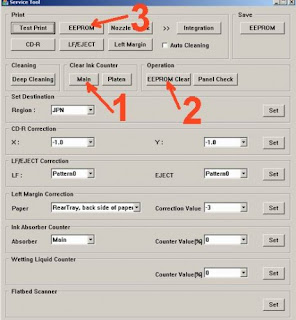
- Extract and run reseter Canon iP2770 printer by clicking 2 times file ServiceTool_V1074.exe In the software window that opens,
- click on Main then the printer will print a piece of paper with D = 000.0 Click the EEPROM Clear Continue to click the button EEPROM then the printer will print 1 paper width more one reads row TPage (TTL = 00000).
- Turn off the printer and then turn on the printer should be able use back to print.
Searches related to Reset Canon IP 2770
how to reset canon ip2770 printer error 5b00
canon ip2770 service tool v3400
how to reset canon ip2770 ink level
reset ip2770 ekohasan
how to reset canon ip2770 manually
how to reset canon ip2770 printer ink
how to reset canon ip2770 ink absorber is almost full
canon ip2700 resetter
Available link for download
Subscribe to:
Posts (Atom)