Showing posts with label 41. Show all posts
Showing posts with label 41. Show all posts
Tuesday, March 7, 2017
REFILL CARTRIDGE 41
REFILL CARTRIDGE 41
If you dont understand the method to fill catridge refill 41, try this method ;
Give your comment in guest book and hope it help you friend
Available link for download

Tuesday, December 20, 2016
reseting cartridge PG 40 and CL 41 canon
reseting cartridge PG 40 and CL 41 canon
Solution reseting cartridge for Canon MP-160:

MP-160 is different from MX300 so I tried my best with it...
The main solution is to reset the entire printer:
1. Disconnect the power cable
2. Connect it while holding down the power button
3. With the power button still down, press twice the "Cancel/Stop" red button
4. Release the power button
5. The printes turns into a kind of factory mode...(wait for about 10 seconds, utils it says "Idle")
6. Press the ">" (next to the "OK" button) once."Shipping Mode 3"
7. Press the "OK" button.
8. Press "OK" again for "Without cleaning"
9. A test page will print..
10. Open the cover, like you are about to change the cartridges.
11. Disconnect the power cable again.
12. Take out both cartridges.
13. Close the cover.
14. Connect the power cable once again.
15. Turn the printer on.
16. Now just put the cartridges back...
good luck..........
MP-160 is different from MX300 so I tried my best with it...
The main solution is to reset the entire printer:
1. Disconnect the power cable
2. Connect it while holding down the power button
3. With the power button still down, press twice the "Cancel/Stop" red button
4. Release the power button
5. The printes turns into a kind of factory mode...(wait for about 10 seconds, utils it says "Idle")
6. Press the ">" (next to the "OK" button) once."Shipping Mode 3"
7. Press the "OK" button.
8. Press "OK" again for "Without cleaning"
9. A test page will print..
10. Open the cover, like you are about to change the cartridges.
11. Disconnect the power cable again.
12. Take out both cartridges.
13. Close the cover.
14. Connect the power cable once again.
15. Turn the printer on.
16. Now just put the cartridges back...
good luck..........
Available link for download
Sunday, December 18, 2016
Reset Ink Level on Canon PG 40 41 using iPtool software
Reset Ink Level on Canon PG 40 41 using iPtool software
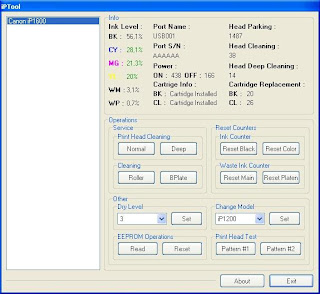
This problem usually appear after refilled the cartridge on the canon printer and ink level indicator showing the ink cartridge is empty although you have filled a cc Ink into the cartridge. And if the problem occur you cannot using your printer to print. The solution you must reset ink level on the printer if you want your computer work again.
If you have a problem like that you ca follow this tutorial to solve your printer problem, here how:
1. Turn of the printer and Disconnect the power cable to the printer.
2. Press power button on the printer. While pressing the button connect the power cable to the power source (the power indicator will light in green)
3. While still holding power button press resume button twice – orange blink and return to green.
4. Release the power button, then the PC will recognize new cartridge installed (If the power indicator on the printer steady in green you continue to Steps 5)
5. Run the IPtools software, please await after this software detect your printer correctly or you can set the printer model on “Change Model” section.
6. Click “reset black and reset color” button to reset the ink level and Click “reset main and reset platen” to reset waste ink counter. After clicked the button you will see ink level of the cartridge on in the IPTol info has 100% and WP and WM has set to 0. Click Exit on IPTool
7. Turn off the printer and turn on again.
On the reset procedure above usually the problem found on steps 1-4 to make the printer steady light in green. On my experiment if steps 1-4 does not work on your printer, you can use manual reset method for canon iP1700 before continue to steps 5.
Available link for download
Friday, November 25, 2016
Opera Terbaru 38 0 2220 41 Final Offline Installer
Opera Terbaru 38 0 2220 41 Final Offline Installer

Opera Offline Installer adalah salah satu browser yang ringan tercepat juga setelah Google Chrome, Belum lama ini Developer Opera juga Mengeluarkan versi terbaru dari produk Browser Opera Mereka, yaitu Opera 38.0.2220.41 Final Offline Installer. Browser Opera merupakan pilihan pertama bagi mereka yang menggunakan PC yang sudah cukup tua dan operasi windows. Opera Offline Installer ini juga merupakan alternatif yang terbaik setelah browser default bawaan miicrosoft yaitu Internet Explorer (IE).
Salah satu keunggulan Browser Opera ini adalah rendahnya persyaratan untuk sumber daya sistemnya, bahkan Browser mungil ini mampu berjalan System Operasi dengan Memory 6 Mb, hebat bukan? Ayo bagi anda yang ingin mencoba browser ajaib Opera Offline Installer terbaru ini, segera download dengan gratis disini.
Key Features
- The process for access to your favorite sites using the Speed Dial
- Protection against fraud
- BitTorrent client
- ******* blocker
- Add your search engine
- View thumbnails of open pages
- The settings for each site separately
- The use of widgets
- New editing
- Download Manager
- Navigation tabam
- Password Manager
- Integrated search
- Pop-up Blocker
- Mouse Gestures
- The fast forward
- Quick setup by pressing F12
- Voice control
- “Hot” Keyboard
- The ‘Trash’
- Supports data protection protocol SSL, version 3, and TLS 1.0 protocol and 1.1
- 256-bit encryption
- Removal of personal data
- Manage ******s
- E-mail the opera browser
- IRC-Chat
- Support “Drag and drop”
- Support for skins Interface
Link Download
ZippyShare
Opera 38.0.2220.41 Final Offline Installer (37 Mb)
ZippyShare
Opera 38.0.2220.41 Final Offline Installer (37 Mb)
Available link for download
Subscribe to:
Posts (Atom)