Wednesday, March 22, 2017
Reset the ink level for Canon MX308
Reset the ink level for Canon MX308
Misalnya kamu ingin membuat menu Depan, Tentang, dan Portofolio. maka kamu harus membuat postingan dengan Judul/Title: Depan, Tentang, dan Portofolio, dengan demikian kita akan mempunya 3 halaman dengan url http://nama.blogspot.com/depan.html, http://nama.blogspot.com/tentang.html dan http://nama.blogspot.com/portofolio.html.
Selanjutnya ikuti langkah-langkah pembuatan menu secara otomatis menggunakan List-O-Matic. Setelah semua langkah di lakukan, kamu akan di beri 2 jenis kode yaitu HTML dan CSS.
Here is the CSS for this list:
#navlist ul
{
margin-left: 0;
padding-left: 0;
white-space: nowrap;
}
#navlist li
{
display: inline;
list-style-type: none;
}
#navlist a { padding: 3px 10px; }
#navlist a:link, #navlist a:visited
{
color: #fff;
background-color: #036;
text-decoration: none;
}
#navlist a:hover
{
color: #fff;
background-color: #369;
text-decoration: none;
}
Sedangkan untuk kode CSS harus di copy dan di letakkan dalam kode template. Di halaman template blog kamu, pilih Edit HTML, letakkan kode CSS dari List-O-Matic tadi sebelum kode ]]> dan save template.
Selamat Mencoba !
Available link for download

Friday, March 17, 2017
Reset Ink Level Epson L100 L200 L800
Reset Ink Level Epson L100 L200 L800
Download Program Reset Ink Level Epson (WIC Reset Utility.) to L100, L200, L800
Download Service Manual :L100 , L200
Available link for download
Sunday, March 12, 2017
Reset Ink Level pada Canon MP150
Reset Ink Level pada Canon MP150

1) With the printer powered off but connected to a power source, press the Power button while pressing and holding the Stop/ Reset button.
2) When the Power is lit, press the Stop/Reset button two times while pressing and holding the Power button.
3) When releasing the Power button and the Stop / Reset button (regardless of order), the printer will move into a service mode. (Waiting for menu selection)
4) When the on/off lights in green, press the Stop/Reset button the specified number of time(s) according to the
function listed in the table below.(Each time the Stop/Reset button is pressed, the LED lights alternately in
orange and green, starting with orange.)note: press 4 times for waste ink counter reset.
The number of the Reset button pressing
LED Function Remarks
0 time Green Power off
1 time Orange Service pattern print
2 times Green EEPROM print
3 times Orange EEPROM reset
4 times Green Waste ink counter reset
5 Turn off the printer.( it must be turn off)and then turn it on again.
Available link for download
Wednesday, December 21, 2016
Reset the ink level for Cartridges HP 21 HP 27 HP 818 HP 802 HP 56 HP 58 HP 22 HP28 and HP 57
Reset the ink level for Cartridges HP 21 HP 27 HP 818 HP 802 HP 56 HP 58 HP 22 HP28 and HP 57
Reset the ink level for Cartridges HP 21, HP 27,HP 818,HP 802, HP 56, HP 58, HP 22, HP28 and HP 57


Available link for download
Sunday, December 18, 2016
Reset Ink Level on Canon PG 40 41 using iPtool software
Reset Ink Level on Canon PG 40 41 using iPtool software
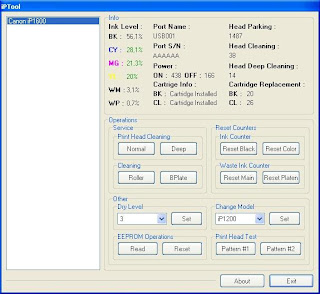
This problem usually appear after refilled the cartridge on the canon printer and ink level indicator showing the ink cartridge is empty although you have filled a cc Ink into the cartridge. And if the problem occur you cannot using your printer to print. The solution you must reset ink level on the printer if you want your computer work again.
If you have a problem like that you ca follow this tutorial to solve your printer problem, here how:
1. Turn of the printer and Disconnect the power cable to the printer.
2. Press power button on the printer. While pressing the button connect the power cable to the power source (the power indicator will light in green)
3. While still holding power button press resume button twice – orange blink and return to green.
4. Release the power button, then the PC will recognize new cartridge installed (If the power indicator on the printer steady in green you continue to Steps 5)
5. Run the IPtools software, please await after this software detect your printer correctly or you can set the printer model on “Change Model” section.
6. Click “reset black and reset color” button to reset the ink level and Click “reset main and reset platen” to reset waste ink counter. After clicked the button you will see ink level of the cartridge on in the IPTol info has 100% and WP and WM has set to 0. Click Exit on IPTool
7. Turn off the printer and turn on again.
On the reset procedure above usually the problem found on steps 1-4 to make the printer steady light in green. On my experiment if steps 1-4 does not work on your printer, you can use manual reset method for canon iP1700 before continue to steps 5.
Available link for download
Saturday, December 3, 2016
Reset Ink Level Printer Canon Pixma iP1800 Using iPtool
Reset Ink Level Printer Canon Pixma iP1800 Using iPtool
I get this tutorial from forum http://www.fixyourownprinter.com solve the ink level error in canon Pixma iP1800/Canon Pixma iP1880. Problem in the canon cartridges after refillled, the ink level never reset from the original empty status and you can’t print at all since the ink level are reporting that the cartridges are totally empty.
If you have the like that, try this to solve the problem.
If the problem still occured, do the same procedures from 1 to 3 then.
by the way i recognize the printer that if u park the head of printer in the replace ink area position, there will be a blinking error u will notice after a few print or after used you need to reset the eeprom in iptools.
Available link for download
Saturday, November 26, 2016
Reset Ink Counter Level Canon iP1000
Reset Ink Counter Level Canon iP1000
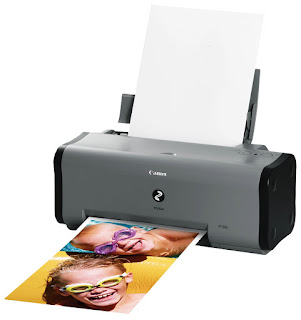
Heres some tips for your Canon Pixma IP1000. I have two IP1000 printer, one is broken because the head need to be replaced, but the other is still powerful. I like this printer because the simple operational
the low budget, the one that I like most is the fast printing.
The problem that I have when using this printer is when the ink waste absorber is full, and he start to blink. Ok guys, Heres some tips for you who still use this printer.
How to physically change the ink waste absorber? Pixma ip1000
The waste ink absorbers can be found at the bottom of the printer case.
Normally youll have to open the printer case, loose the screws of the print unit and remove the hole print unit from the lower part of the printer case.
4 step to Reset waste ink tank counter CANON PIXMA iP 1000
STEP 1:- Disconnect printer from AC power
STEP 2:- Press and HOLD the POWER button, and connect printer to AC power
STEP 3:- release the the POWER button
STEP 4:- Press the POWER button again
If your IP1000 Blinking try this Tips :
Step 1: Manual for Service mode
1. Unplug POWER and USB cables.
2. Open door, PRESS and HOLD the POWER button.
3. Connect the POWER cable.
4. Close door, then release POWER button.
5. Power ON your printer a usual (It should not blinking anymore)
Step 2 : Software for Permanant
1. Reconnect the USB cable and turn ON your Printer
2. Open "General Tools for iP1500", Downloadh The Software here
3. Select (USB PORT)
4. Choose CLEAR WASTE INK COUNTER - MAIN
5. Choose CLEAR WASTE INK COUNTER - PLATEN
It should be working, coz my printer now work normally
Notes. Before you decide to reseting the waste ink counter, you should really clean up the ink absorber, or else you will find the ink watse absorber overflow...
Available link for download
Thursday, October 13, 2016
Reset ink level epson L100 L200 tanpa SN tinta
Reset ink level epson L100 L200 tanpa SN tinta
Seseorang pasti ada yg memikirkan bagaimana melakukan Autoretweet dengan mudah tanpa memakai yahoo pipes dan twitterfeed, atau lainya.. Dan pasti ingin yang instan dan selesai hehe
 .
.2012 Ini ada situs baru dan tentunya pemeran topik ini hoho.. Saya akan share caranya dibawah ini:
• Pertama kamu pergi ke RoundTeam.Co dan https://dev.twitter.com/ memakai browsermu• Kemudian klik gambar Start dan authorize aja aplikasi twitternya• Setelah udah login. Akan ada notif yes ataunopilih yang yes dan dibawa ke apps twitter authorize aja sekali lagi.. Jika ada notif seperti itu lagi, klik yes lagi, dan setelah itu success• Kemudian tinggal skroll sedikit kebawah ada tulisan All Twitter disampingnya ada tombol buat edit.. Itu untuk nambah siapa teman yg mau kamu retweetin otomatis setiap dia update tweet• Bisa juga kamu memasukan hashtags disana..
Available link for download
Friday, September 30, 2016
Reset Ink Level Canon MX300 Cartridges
Reset Ink Level Canon MX300 Cartridges
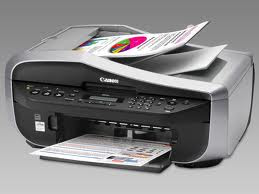
The Canon PIXMA MX300 is All-in-One Inkjet Printer designed for office uses. This canon printer combine scan, fax, copy, and print into one easy machine. Canon MX300 can scan vivid images with color resolutions up to 4800 x 1200 dpi. This all in one printer compatible with Windows Vista, Windows XP, Windows 2000, and Mac OS X 10.2.8 to 10.4.x8 operating systems and printer using PG-40 black cartridge and CL-41 color cartridge.
“solusi-printer.maherna.com” have not found the software resetter for Canon Pixma MX300 in internet but don’t worry if you have problem with this multifuction canon printer, you can reset it manually. This reset method is to reset ink level in Canon MX300 if your printer stop to print after refilling the cartridges. Update: severals readers say, this reset methods also work on Canon MX308.
Here the Solution to reset the ink level for Canon Pixma MX300 follow this steps to reset the ink level in your canon MX300.
1. Switch off the Canon MX300 and disconnect the power cable.
2. While press and hold the power button, Connect the power cable to electric socket.
3. While pressing the power button, press the “Cancel/Stop” button (red button).
4. Now release the power button and the printer turns into a kind of factory mode. Wait for 10 seconds until it says “idle”.
5. Press “>” (next button) once “Shipping Mode 3? then Press the “OK” button. Press “OK” again for “without cleaning”.
6. A test page will print.
7. Open the cover, like you are about to change the cartridges.
8. Disconnect the power cable again without switch off the printer.
9. Take out the both cartridges.
10. Close the cover.
11. Connect the power cable and turn on the printer.
12. Now just put the cartridges back and the ink level in the canon Pixma MX300 have full again.
Available link for download