Showing posts with label mp198. Show all posts
Showing posts with label mp198. Show all posts
Friday, February 10, 2017
Resetter Canon mp198 error E27 Ink Absorber is Full
Resetter Canon mp198 error E27 Ink Absorber is Full
Way Resetter Canon mp198 error E27 "Ink Absorber is Full" Way Resetter Canon mp198 error E27
- The printer is turned off and plugged the power cord.
- Press and hold STOP / RESET then press and hold POWER.
- Release the button STOP / RESET (do not release the POWER button)
- Press the STOP / RESET 2 (two) times, then release the POWER button
- Let the green light blink / kelip2x until the printer head stops moving. And LED panel shows the number zero.
- The computer will detect new hardware, ignore it .....
- This situation is shown in a state mp198 printer SERVICE MODE and ready to be reset.
DOWNLOAD PROGRAM RESETTER Canon mp198 in HERE .
- File Exctract Resetter mp198.
- 2 Prepare a paper in the printer (to print at the time of the reset)
- Run the program Resetter mp198.
 Available link for download
Tuesday, December 6, 2016
Reset software program for Canon MP198 MP258 MP276 MP496 MP558 MP568 and MP648
Reset software program for Canon MP198 MP258 MP276 MP496 MP558 MP568 and MP648
Reset software program for Canon MP198, MP258, MP276, MP496, MP558, MP568, and MP648
FIX PRINTER ERROR "parts inside printer end service life, waste ink pad counter overflow error"
Follow the following steps:
All these steps must be done to reset your canon MP198, MP258, MP276, MP496, MP558, MP568, and MP648 printer.

Resetting Ink counter on the Printer.
Step 1:
Run “service_tool 1050.exe”. You can download the service tool software from this link: ServiceTool_1050Step 2:
Confirm detected USB-port numbers on USB port column.
Step 3:
Click “Main button” on Clear ink counter section. Make sure there are papers in the paper feed because the printer
will print after the process is complete.
Step 4:
Click “platen button” on the “Clear ink counter” section. The printer will print again.
Step 5:
Turn off the printer and then turn the printer on. You printer is ready for use.
Available link for download
Friday, September 30, 2016
Reset Canon MP198 MP258 MP276 MP496 MP558 MP568 dan MP648
Reset Canon MP198 MP258 MP276 MP496 MP558 MP568 dan MP648
Below are all the steps that must be done to reset canon MP198 Anda, MP258, MP276, MP496, MP558, MP568, and MP648 printer.
Follow these steps :
1 Turn off printer . and free USB cable printer from ur pc ..
2. While printer OFF, press Start button printer . canon another model press Resume button.
3. while press Stop button / continue button / cancel button, press and hold power. 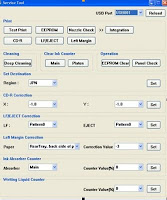
Follow these steps :
1 Turn off printer . and free USB cable printer from ur pc ..
2. While printer OFF, press Start button printer . canon another model press Resume button.
3. while press Stop button / continue button / cancel button, press and hold power.
4.while POWER LED green (light) , free Start / Stop button. ( still press POWER button).
5. Press power button , press Start / Stop button to continue/ cancel twice then free power button. Wait till LCD printer display nol ( 0 ) number.
6. Then, afer screen 0, pairs UDB cable printer to ur pc ,de ected a new device will be installed (normal)
Reset Ink counter Printer
5. Press power button , press Start / Stop button to continue/ cancel twice then free power button. Wait till LCD printer display nol ( 0 ) number.
6. Then, afer screen 0, pairs UDB cable printer to ur pc ,de ected a new device will be installed (normal)
Reset Ink counter Printer
7 Download Service_tool to resset.:
Available link for download
Subscribe to:
Posts (Atom)