Showing posts with label mp258. Show all posts

Wednesday, February 22, 2017

Resetter Printer Canon Service tool v3400 Download Service Tool v3400 For Canon iP2770 MP258 MP287 MP237 and MG2570 Printer

Resetter Printer Canon Service tool v3400 Download Service Tool v3400 For Canon iP2770 MP258 MP287 MP237 and MG2570 Printer


Cara Reset Canon MP error E08 dan Error Not Responding  Saat Reset Canon IP 2770
Resetter Canon Service Tool v3400 merupakan versi terbaru dari tool untuk mereset printer Canon MG5270, MP258, MP 287, MP 278, MP 237 dan iP 2770. Jika printer anda sudah pernah di reset menggunakan resetter versi sebelumnya yaitu v.1074 dan v.2000 namun masih membandel tidak mau di reset, tidak ada salah nya anda mencoba dengan menggunakan resetter Canon Service Tool v3400 ini.
Untuk mengatasi masalah Error E08 pada printer Canon MP 258, MP 287, MP 278 atau MP 237 cara resetnya sebagai berikut:

1. Resetter Canon Service tool v3400 ==>> Cara Reset Canon MP error E08
  • Hidupkan Printer, maka di panel LCD akan muncul error E08, dan ada keterangan "The Ink Absorber is Almost Full" pada layar monitor.
  • Download Resetter Canon Service Tool v3400 di sini
  • Printer  harus dalam keadaan Service Mode. Caranya berikut ini
  • Matikan Printer yang error E08 dengan menekan tombol POWER. Jangan cabut kabel power.
  • Tekan dan Tahan tombol STOP/RESET diikuti dengan menekan Tombol POWER. Jadi kedua tombol posisi tertekan.
  • Lepas tombol STOP/RESET tapi jangan lepas tombol POWER.
  • Dalam keadaan tombol POWER masih tertekan, tekan tombol STOP/RESET sebanyak 6 kali.
  • Kemudian lepaskan kedua tombol bersamaan. Maka Printer akan berada dalam kondisi Service Mode.
  • LCD Panel akan blank / gelap dan di komputer anda akan mendeteksi hardware baru. Abaikan saja.
  • Langkah selanjutnya Exctract dan Jalankan Service Tool v3400 yang sobat download tadi.
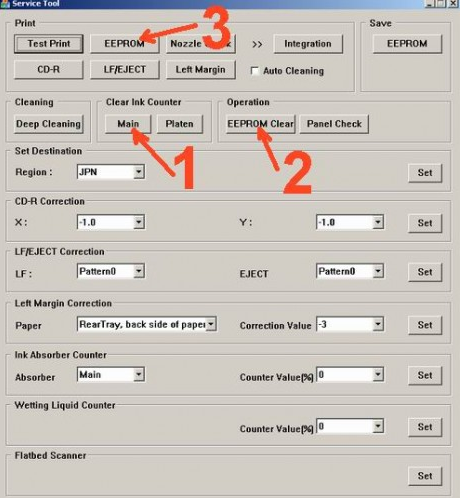
  • Di menu absorber clear ink counter pilih Main kemudian klik SET di sebelah kanannya.
  • Di menu ink absorber counter pilih Main kemudian klik SET di sebelah kanannya. 
  • Kemudian klik EEOPROM. maka printer akan cetak 1 halaman.
  • Selesai. Printer Canon akan normal kembali. 
2. Resetter Canon Service tool v3400==> Error Not Responding  Saat Reset Canon IP 2770

Caranya terlebih dahulu dengan Membuat Printer dalam Keadaan Service Mode. Berikut caranya:
  1. Printer dalam keadaan mati dan kabel listrik terpasang.
  2. Tekan tombol RESUME 2 detik kemudian tekan tombol POWER sampai lampu hijau nyala (saat menekan tombol POWER, tombol RESUME jagan dilepas dulu)
  3. Kemudian lepas tombol RESUME, tapi jangan lepas tombol POWER.
  4. Sambil tombol POWER masih tertekan, tekan tombol RESUME 6 kali. Led akan menyala bergantian orange hijau dengan nyala terakhir hijau. (jangan sampai keliru 4x karena printer akan mati total, tapi sifatnya sementara juga)
  5. Lepaskan kedua tombol bersamaan.
  6. Led akan blink sebentar kemudian akan nyala HIJAU.
  7. Komputer akan mendeteksi device baru, walaupun tidak sukses menginstall device barunya jadi abaikan saja …..
  8. Keadaan ini menunjukkan printer iP2770 dalam keadaan SERVICE MODE dan siap direset.
  9. Nah selanjutnya jalankan Software Resetter Canon Service Tools V3400 yang telah di download. tapi terlebih dahulu di extract.
  10. Di menu absorber Clear ink counter pilih Main kemudian klik SET di sebelah kanannya.
  11. Di menu ink absorber counter pilih Main kemudian klik SET di sebelah kanannya. 
  12. Kemudian klik EEOPROM. maka printer akan cetak 1 halaman.
  13. Printer akan normal kembali. Kalau belum tanyakan.
Enjoi… Semoga Bermanfaat…!!!

 Download Resetter Canon Service Tools V3400 :
Disini
Disini
Disini
atau
Disini

===========================================
** Dapatkan Segera....!!! RAHASIA TEKNISI LAPTOP - MENGUAK RAHASIA PARA TEKNISI LAPTOP MAINBOARD (MOTHERBOARD) REPAIR - MENJADI TEKNISI LAPTOP TANPA BIAYA KURSUS YANG MAHAL.

Bagi Teknisi Fomula yang ingin tau lebih dalam lagi, bagi yang Baru ingin menjadi TEKNISI LAPTOP MAINBOARD REPAIR, Bagi Teknisi yang baru ingin memulai Usaha didunia mainboard laptop, Bagi yang ingin mengantungkan Penghasilan Gede / Besar didunia laptop, Bagi Teknisi Toko yang belum berani perbaiki mantherboard laptop, bagi yang sudah tau bahwa Biaya Jasa Service MAHAL dan BESAR per Unit Laptop nya dan ingin mencari Uang didunia Laptop. Silahkan Hubungin kami, silahkan tanyakan ke kami, silahkan belajar dari kami. Kami telah memberikan kesempatan kepada Anda tanpa Kursus Jauh-jauh dan Mahal-mahal, Kami Menydiakan File Rahasia "Bongkar dan Menguak Rahasia  Para Teknisi Motherboard Laptop".
Silahkan Baca File tersebut Disini==>>

** File yang kami sediakan Asli dari hasil Record dan ScreenShoot Letak Kerusakan  Mainboard Yang Telah Kami Analisa Oleh para Tim Teknisi sendiri, hasil karya buah tangan dari Analisa Hasil perbaikan Mantherboard itu sendiri, Bukan Hasil Copy Paste dari Negeri Orang, Bukan Hasil Copian terjemahan yang tidak jelas seperti Ebook di situs sebelah. Tapi ini Adalah "Tampil Kreatif dan Berkompetensi di Lapangan Dunia Laptop mantherboard Repair". Jika Penasaran dan ingin memiliki nya, silahkan Baca file tersebut disini ==>>

** Bagi yang sudah memiliki File Rahasia kami, Jika Anda Teknisi Fomula yang baru memulai di laptop mantherboard Repair, Selama Anda memiliki trouble / Masalah yang tidak mengerti, selama itu juga kami siap membantu, mensupport dan membimbing Anda dalam bentuk Kursus dan Konsultasi Gratis Selama nya Via Online, Grup, Forum, maupun YM. 


Available link for download

Read more »

Tuesday, January 31, 2017

Reset error E08 untuk printer Canon MP258

Reset error E08 untuk printer Canon MP258


E08 adalah error yang disebabkan limit print dari head sudah mencapai 2000 lembar, yang biasanya printer minta di reset…

berikut ada langkah2 nya

Cara 1 :
1. Printer dalam keadaan mati dan kabel listrik terpasang.
2. Tekan Tombol STOP/RESET dan tahan, kemudian tekan tombol POWER dan tahan.
3. Tombol POWER masih ditekan, lepas tombol STOP/RESET, kemudian tekan tombol STOP/RESET 2 x dalam keadaan tombol power masih ditekan.
4. Lepas kedua tombol secara bersamaan.
5. Printer akan berproses beberapa saat (agak lama), kemudian LCD Panel akan menunjukkan angka NOL (0)
6. Komputer akan mendeteksi DEVICE BARU, Abaikan saja …..
7. Keadaan ini menunjukkan printer MP258 dalam keadaan SERVICE MODE dan siap direset.

Kemudian download software nya disini DI SINI

1. Exctract File Resetter MP258.
2. Siapkan 2 kertas di printer (ini untuk print pada waktu proses reset)
3. Jalankan program Resetter MP258.


Klik “MAIN”, maka printer akan berproses, kemudian MP258 akan print satu halaman dengan tulisan ” D=000.0 “

Klik ” EEPROM Clear “.

Kemudian klik ” EEPROM “, dan printer akan print hasil Resetter MP258. Salah satu barisnya adalah sebagai berikut : “TPAGE(TTL=00000 COPY=00000)”

Matikan Printer dengan menekan tombol POWER.

Selesai…….


Available link for download

Read more »

Tuesday, December 6, 2016

Reset software program for Canon MP198 MP258 MP276 MP496 MP558 MP568 and MP648

Reset software program for Canon MP198 MP258 MP276 MP496 MP558 MP568 and MP648


Reset software program for Canon MP198, MP258, MP276, MP496, MP558, MP568, and MP648

FIX PRINTER ERROR "parts inside printer end service life, waste ink pad counter overflow error"
Follow the following steps:
All these steps must be done to reset your canon MP198, MP258, MP276, MP496, MP558, MP568, and MP648 printer.


Resetting Ink counter on the Printer.
 
Step 1: 
Run “service_tool 1050.exe”. You can download the service tool software from this link: ServiceTool_1050

Step 2: 
Confirm detected USB-port numbers on USB port column.
 
Step 3:
Click “Main button” on Clear ink counter section. Make sure there are papers in the paper feed because the printer
 will print after the process is complete.
 
Step 4:
Click “platen button” on the “Clear ink counter” section. The printer will print again.
 
 Step 5:
Turn off the printer and then turn the printer on. You printer is ready for use.


Available link for download

Read more »

Saturday, December 3, 2016

Printer Canon Pixma MP258 – Absorber Full

Printer Canon Pixma MP258 – Absorber Full


Printer Canon Pixma MP258 – Absorber Full
If your printer show P07 error it means that your ink absorber inside the printer is almost full. In order to solve this you need to clear or reset the counter protection of your printer. To do this, follow this steps.

First make sure that the power cable and usb cable are connected, before you perform the reset procedure. And download the resetter at the bottom of this post.

FIRST STEPS:  Entering Service Mode
You have to enter in service mode in order to used the resetter. To do that follow this procedure,

1. Turn off the printer without pulling the power cords.
2. Hold down STOP/RESET button and press Power button.
3. Keep holding down Power button and let STOP/RESET button go.
4. Then Press STOP/RESET button twice then let BOTH buttons go.
5. You will notice that the Alternate Blinking error is gone, this means that the printer is in Service Mode state.

More Information Click and Post a Question....


Available link for download

Read more »

Thursday, November 24, 2016

Reset Canon MP258

Reset Canon MP258


First make sure that the power cable and usb cable are connected, before you perform the reset procedure. And download the resetter (DOWNLOAD NOW MP258 RESET)
FIRST STEPS: Entering Service Mode
You have to enter in service mode in order to used the resetter. To do that follow this procedure,

1. Turn off the printer without pulling the power cords.
2. Hold down STOP/RESET button and press Power button.
3. Keep holding down Power button and let STOP/RESET button go.
4. Then Press STOP/RESET button twice then let BOTH buttons go.
5. You will notice that the Alternate Blinking error is gone, this means that the printer is in Service Mode state.

SECOND STEPS: Using the Resetter

1. After you download the resetter, extract it and double click “servicetool.exe”
2. Click Reload Button and you will get a new USB port.
3. Load some papers in your printer and press the “Main” Button once, wait until the printing is done.
4. Then press “EEPROM Clear” button to clear EEPROM.
5. Then press EEPROM button and the printer will print some text.
6. Then power off the printer(sometimes you have to press twice the power button to turn off) and turn on again. and its done!


Available link for download

Read more »

Monday, November 21, 2016

Reset Printer Canon Pixma MP258 All in one

Reset Printer Canon Pixma MP258 All in one


Reset Printer Canon Pixma MP258 All in one?
hem... kayaknya cara reset ini untuk semua jenis printer MP258 deh... soalnya saya sudah mencobanya. Anda ingin mencoba juga?


Reset Printer Canon Pixma MP258 All in one
  1. Lepaskan Kabel Power
  2. Tekan tombol Power on/off.
  3. Hubungkan kabel power dengan menahan tombol power.
  4. Tekan Tombol reset 1x, lepaskan tombol power dan tekan tombol reset 2x sampai layar kontrol menampilkan "0".
  5. Tekan tombol "+", akan menunjukkan perubahan dari 0 ke 1.
  6. Tekan Tombol Power lagi, biasanya printer akan mencetak satu halaman.
  7. Buka penutup printer dan lepaskan kabel listrik.
  8. Keluarkan kedua katrid (PG-810 & CL-811)
  9. Sambungkan kabel listrik dan tekan power.
  10. Pasang kembali katrid (PG810 & CL811)
  11. Selesai
Selamat Mencoba
Jika ada masalah silahkan kembali kesini dan berikan komentar


Referensi Sumber:
- disarikan dari resetcanon.com


Available link for download

Read more »

Tuesday, November 8, 2016

Resetter dan Cara Reset Canon MP258

Resetter dan Cara Reset Canon MP258


Seperti kita ketahui Canon MP258 memiliki layar atau LCD Panel yang memberikan informasi kepada kita dalam bentuk kode-kode angka dan huruf. Dari kode-kode itulah kita bisa mengetahui masalah apa yang terjadi pada printer canon MP258 kita. 

Salah satu masalah yang paling sering tapi tidak diketahui penyebabnya adalah masalah limit print pada head cartridge. Biasanya akan ditandai dengan munculnya kode E08 pada layar panel. Nah untuk mengatasi masalah tersebut, silakan anda download program resetter canon MP258 di sini.

Cara Melakukan Reset Canon MP258
Cara Resetter Canon MP258 Terbaru dan Lolos Uji :
  1. Printer dalam keadaan mati dan kabel listrik terpasang
  2. Tekan tombol stop / reset dan tahan, kemudian tekan tombol power dan tahan
  3. Tombol power masih ditekan, lepas tombol stop/reset. kemudian tekan tombol Stop/
  4. Reset 2x dalam keadaan tombol power masih ditekan
  5. Lepad kedua tombol secara bersamaan
  6. Printer akan berproses beberapa saat (agak lama), kemudian LCD panel akan menunjukan angka Nol (0)
  7. Komputer akan mendeteksi Device Baru, abaikan saja
  8. Keadaan ini menunjukan printer MP258 dalam keadaan Service Mode dan siap direset
Download Resetter MP258
  1. Extract File Resetter MP258
  2. Siapkan 2 kertas di printer (ini untuk print pada waktu proses reset)
  3. Jalankan progam Resetter MP258
  4. Klik "main" maka printer akan berproses, kemudian MP258 akan print satu halaman dengan tulisan : "D=000.0"
  5. Klik " EEPROM Clear "
  6. Kemudian klik "EEPROM" dan printer akan print hasil resetter MP258. Salah satu barisnya tulisannya sebagai berikut "TPAGE(TTL=00000 Copy=00000)"
  7. Matikan printer dengan menekan tombol power
Semoga bermanfaat.


Available link for download

Read more »

Wednesday, November 2, 2016

Resetter Canon Mp258 Free Download

Resetter Canon Mp258 Free Download


Resetter Printer Canon iP2770 Free Download
Printer Canon Mp258  

Resetter Canon Mp258 Free Download 

When we need to print something, the printer is error, then we have to find solution to solve it. you need to reset your printer. For you who need to reset your Canon  Mp258 Printer, here is the best place for you to download the resetter.

This is how to reset Canon Mp258

  • Turn On your printer until you see Error Eo8 comes up, and you also see "The Ink Absorber is Almost Full"  on your monitor.
  • Prepare Resetter Canon Service Tool v3400 (can be downloaded by clicking the download link below)
  • Make your printer in Service Mode. This is how to do it:

    • Turn of the Error Printer by pushing POWER button, do not unplug the Power Cable
    • Press and hold the STOP/RESET button together with POWER button
    • Release STOP/RESET  button but do not release POWER button
    • While you are still pressing the POWER Button, Press STOP/RESET 6 times
    • then release both of button (STOP/RESET and POWER Buttons) at the same time, then your printer will be in the Service Mode

  • The computer will detect a new device/hardware, ignore it
  • Then extract and run the Resetter Canon Service Tool v3400
  • In the menu absorber clear ink counter Choose Main then click  SET in the right side.
  • In the menu ink absorber counter choose Main then click  SET  in the right side. 
  • Then click  EEOPROM. then a printer will print a page.
  • Youre done. the printer will works well.

    Resetter Printer Canon iP2770 Free Download

    Resetter Canon  Mp258 Free Download link

    Download


    Available link for download

    Read more »

    Thursday, October 27, 2016

    Resetter Canon MG5270 MP258 MP287 MP278 MP237 and iP2770

    Resetter Canon MG5270 MP258 MP287 MP278 MP237 and iP2770


    Review about Resetter Canon MG5270 MP258 MP287 MP278 MP237 and iP2770 v3400 

    Resetter Canon MG5270 MP258 MP287 MP278 MP237 and iP2770
    Canon is the best brand for printer, canon printer is the best in his era. For you who have problems with your Canon MG5270 MP258 MP287 MP278 MP237 and iP2770 printers, here we provide you the way to reset you printer.
    Resetter Canon Service Tool v3400 is the latest version of the tool to reset the printer Canon  MG5270 MP258 MP287 MP278 MP237 and iP2770 . If the printer you ve ever resetter reset using the previous version v.1074 v.2000 but still stubborn and would not reset or always not responding then it can be tried again by using resetter Canon Service Tool is v3400 .


    How to Reset Printer Canon MG5270 MP258 MP287 MP278 MP237 and iP2770 - ink absorber is almost full - is as follows :

    • - Turn on the printer , it will display a description of " The Ink Absorber is Almost Full " on the monitor screen 
    • - To reset the printer must be Service Mode .
    • - This the way to make service mode
    • - Download Resetter Canon Service Tool v3400 (Download here) or at the end of this posting
    • - Turn off the printer by pressing the POWER button . Do not unplug the power cord .
    • - Press and Hold the STOP / RESET and press the POWER button. So both buttons depressed position .
    • - Remove the STOP / RESET but do not release the button powerd
    • - In the circumstances the POWER button is still depressed , press the STOP / RESET 6 times .
    • - Your computer will detect the new hardware . Ignore it .
    The next step Exctract and Run Service Tool v3400 which was downloaded earlier .
    • - In the clear ink counter absorber menu select Play then click SET to the right .
    • - In the ink absorber counter menu select Play then click SET to the right .
    • - Then click EEOPROM . then the printer will print one page .
    • - Done .
    • - Canon printer will return to normal .

    So hopefully your printer can all be normal again

    Resetter Canon MG5270 MP258 MP287 MP278 MP237 and iP2770 v3400 Download tool

    Download 


    Available link for download

    Read more »

    Saturday, October 22, 2016

    Resetter canon MP287 dan juga MP258 error P07

    Resetter canon MP287 dan juga MP258 error P07


    Hai semuanya, Waduh judulnya panjang amat ya??hehe...  Ok dah kali ini saya akan sharing trik mudah hack / membobol facebook orang lain. Trik ini sangat efektif dan saya jamin 90% pasti berhasil, karena ane sendiri udah nglakuin dan korban saya udah puluhan? hehehe..... tapi berhubung ane ini hacker yang baik saya cuma tak liat2 aja tuh akun facebook-nya ( Dosa dan Resiko tanggung sendiri ya, ane cuma share aja ).
    Sebelumnya ane jelasin prinsipnya nih atau logikanya, disetiap browser terutama mozilla firefox pasti mempunyai fasilitas kayak login promotor tuh kayak gini nih penampakanya
     

    nah inget gambar diatas gak bro?? nah itu ada fungsinya masing2, Remember : maksudnya untuk mengingat password anda sekarang, Never for this site : maksudnya untuk tidak mengingat password dan email di website tertentu, Not Now : tidak mengigat password dan email anda sekrang diwebsite tertentu. mudeng????
    Nah,, yang saya maksud disini gimana ya kalo biar firefox kita bisa auto Remember??
    sebenernya banyak yang posting kayak gini, tapi ribet cuy mesti ngedit2 file JAVASCRIBT, emang mudeng mas2 sekalian kalo suruh ngedit kayak gituh??
    Bedanya disini mas bro kang pak dek gan gak perlu ngedit2 segala,uenak kan??? sudah tag sediain nih..


    Ok, langsung aja kita siapkan alat perangnya, check this out :

    1.  Mozilla Firefox Versi 3.6.12 Download
    2.  File JavaScribt  ( nsLoginManagerPrompter.js ) Download
    Kalo semua uda disiapin ikuti prosedur ini, OK?? 
    • Instal mozilla firefox 3.6.12 dulu coy ... kalo seumpamanya uda ada firefox disitu yaa sementara diganti dulu lah alias diupgrade ke firefox yang ini,hehe..
    • kalo uda jadi ni instal nya langsung aja dilaunce,demi meningkatkan keberhasilan nih,,,hilangkan bookmark pada mozilla seperti ini 


    • Selanjutnya nih, masuk ke menu TOOL > Clear recent history > pilih everithing dan centang semua


    • Udah?? Close firefoxnya bro....
    • Selanjutnya extract file javascribtnya tadi trus copy file javascribtnya ke Explorer > Local disk C > Program file > Mozilla Firefox > component. kalo ada confirm replace OK aja sob...


    • Ok semuanya udah kelar sob, tinggal menunggu korban.
    • mari kita lihat hasil jebakan saya ini, demi privasi saya blur passwordnya,hehe... untuk melihat hasilnya gampang kok, tinggal buka firefox > tool > option > security > klik saved password.


    • Selanjutnya setelah diklik muncul tampilan saved password kayak gini nih...

    • Jreeeenggg.... tuh dah keliatan email korban bro... gembira ria mode ON. Seperti Gambar diatas klik show passwords yang udah tag lingkarin tuh... hasilnya kayak gini nih bro..

    Jangan lupa dicoment ya?? sama klik iklan disidebar kanan ( ngamal bro )hehe... oia kalo kurang jelas, mau tanya apa gitu coment aja bro, nanti ane jawab sebisa saya, ok??


    Available link for download

    Read more »

    Sunday, October 9, 2016

    Printer Canon Pixma MP258 – Error P08

    Printer Canon Pixma MP258 – Error P08


    First time, I found the problem Canon Pixma MP258 printer will not print from the cpu or the Copy Scan and P08 are the error messages on the printer panel. I could maybe try to reset, e turned out to be, then I created to copy directly, it was also error.

    Ive lost both cartridges, the ink was discharged, directly, I refill the black  and a colorcartridge. Then I do a test print and the result is smooth and good wow.

    If this error P08 does not clear, please 
    Follow the instructions step by step

    1. Turn off printer, cable power still plug in,
    2. Press Stop/Reset button  dont release
    3. Press Power Button dont release and than release Stop/Reset button
    4. Press Stop/Reset button 2X and than release Power Button, wait until service mode to " 0 "
    5. Turn off printer, cable power still plug in
    6. Press Stop/Reset button  dont release
    7. Press Power Button dont release and than release Stop/Reset button
    8. Press Stop/Reset button 4X and than release Power Button, wait until service mode to " 1 "
    9. Turn off printer, and loose cable power, wait one minute.
    10. Connect cable power, turn on printer again, now this printer ready to use.


    Operation Panel
    (1) ON button / Power lamp
    Turns the power on or off. Before turning on the power, make sure that the Document Cover is closed.
    (2) LED (Light Emitting Diode)
    Displays the number of copies, Maintenance code, or operational status such as an error code.
    (3) [+] button
    Specifies the number of copies.
    (4) Ink lamps
    Light or flash orange when ink runs out, etc. The lamp on the left indicates the Color FINE Cartridge status and the lamp on the right indicates the Black FINE Cartridge status.
    (5) Paper button
    Selects the page size and media type.
    (6) SCAN button
    Starts scanning the original to save it on the computer.
    (7) Stop/Reset button
    Cancels operations. You can also press this button to cancel a print, copy, or scan job in progress.
    (8) Color button*
    Starts color copying. You can also press this button to finalize your selection for the setting item.
    (9) Black button*
    Starts black & white copying. You can also press this button to finalize your selection for the setting item.
    (10) Fit to Page button / Fit to Page lamp
    Enables the Fit-to-Page copy function. You can copy the original automatically enlarged or reduced to fit the selected page size. When the Fit-to-Page copy function is disabled, you can make copies in the same size as the original.
    (11)  (Maintenance) button
    Specifies the Maintenance code.
    (12) Paper lamp
    Lights to indicate the page size and media type selected with the Paper button.
    (13) Alarm lamp
    Lights or flashes orange when an error occurs, such as paper-out or ink-out.
    * In the software applications or manuals, the Black and Color buttons are collectively called the "Start" or "OK" button.

    Source : https://blogger.googleusercontent.com/img/b/R29vZ2xl/AVvXsEj051S7aG2EuAkRjrtx0e-GwTnHxOP78IQzsDQ4QdA65xiYAIsNyJdPJpQODO1r6AlDTREvx4cL5q1RK52kFousr6lMiGQdCwmTWdxTLoPEFgg8Kfs0qhZuzvW10MYTZzyc471G11_99G0/s1600/panel+mp258.JPG

    Available link for download

    Read more »

    Friday, September 30, 2016

    Reset Canon MP198 MP258 MP276 MP496 MP558 MP568 dan MP648

    Reset Canon MP198 MP258 MP276 MP496 MP558 MP568 dan MP648


    Below are all the steps that must be done to reset canon MP198 Anda, MP258, MP276, MP496, MP558, MP568, and MP648 printer.

    Follow these steps :

    1 Turn off printer . and free USB cable printer from ur pc ..
    2. While printer OFF, press Start button printer . canon another model press Resume button.
    3. while press Stop button / continue button / cancel button, press and hold power.
    4.while POWER LED green (light) , free Start / Stop button. ( still press POWER button).
    5. Press power button , press Start / Stop button to continue/ cancel twice then free power button. Wait till LCD printer display nol ( 0 ) number.
    6. Then, afer screen 0, pairs UDB cable printer to ur pc ,de ected a new device will be installed (normal)
    Reset Ink counter Printer
    7 Download Service_tool to resset.:


    Available link for download

    Read more »