Saturday, March 18, 2017
Resetter Canon PIXMA MP237
Resetter Canon PIXMA MP237
Canon PIXMA MP237 merupakan printer multi fungsi murah yang bisa melakukan 3 hal sekaligus dalam 1 printer yaitu print, scan, copy. Keberadaan printer multi fungsi dengan harga murah menjadi daya tarik calon pembeli. Dengan 3 fitur dalam 1 perangakat dan berharga cukup terjangkau menjadikan printer ini banyak menjadi pilihan pengguna printer.
Karena banyak yang menggunakan printer Canon MP237, disini saya melihat akan banyak yang membutuhkan resetter MP237 saat mengalami error. Apa fungsi resetter? resetter berfungsi untuk mereset ulang chip yang tertanam pada printer, dimana chip tersebut akan mencatat setiap printer melakukan pencetakan. Ketika chip tersebut mendeteksi jumlah maksimal pencetakan telah tercapai, maka printer akan melakukan blinking dan Canon MP 237 anda tidak bisa digunakan lagi untuk mencetak, disinilah kita membutuhkan resetter MP237.
Cara Reset Canon MP237
- Tahap Menjadikan Printer MP237 Ke Service Mode
Seperti biasa, untuk bisa suskses mereset canon MP237, langkah awalnya adalah kita harus menjadikan printer canon menjadi service mode. Dengan kondisi Service Mode kita bisa melakukan reset terhadap si printer dan berikut ini langkah-langkahnya.- Jika printer dalam keadaan hidup, matikan printer dengan menekan tombol power
- Setelah printer mati, tekan dan tahan tombol STOP/RESET menggunakanakan salah satu jari tangan anda diikuti dengan menekan Tombol POWER (kedua tombol pada posisi tertekan)
- Lepaskan jari yang menekan tombol STOP/RESET tapi tombol power harus terus anda tekan
- Pada posisi tombol POWER masih tertekan, gunakan jari tangan yang lain untuk menekan tombol STOP/RESET sebanyak 6 kali. Setelah anda menekan tombol STOP/RESET 6 kali, lepaskan kedua tombol secara bersamaan.
- Jika anda benar melakukan tahap di atas untuk mereset MP237, seharusnya komputer anda mendeteksi adanya device baru, abaikan saja, karena itu menjadi tanda bahwa anda telah berhasil menjadikan Canon MP237 anda ke Service Mode.
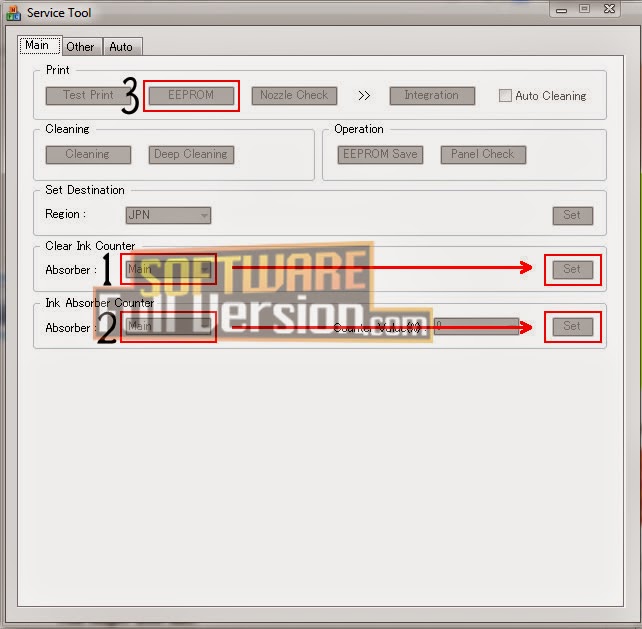
- Tahap Reset Printer Canon MP 237
- Download Resetter Canon MP237 DISINI
- Extract dan jalankan reseter MP237 dengan meng klik 2 kali file Service tool v3400.exe
- Mulailah lakukan memerintah software reseter MP237
- Sub Tab Clear Ink Counter pilih Main
- Sub Tab Ink Absorber Counter pilih Main
- Klik EEPROM maka printer akan mencetak selembar kertas
- Matikan printer dan hidupkan kembali maka printer sudah bisa anda gunakan kembali
SEMOGA BERMANFAAT.
Available link for download

Wednesday, February 22, 2017
Resetter Printer Canon Service tool v3400 Download Service Tool v3400 For Canon iP2770 MP258 MP287 MP237 and MG2570 Printer
Resetter Printer Canon Service tool v3400 Download Service Tool v3400 For Canon iP2770 MP258 MP287 MP237 and MG2570 Printer

- Hidupkan Printer, maka di panel LCD akan muncul error E08, dan ada keterangan "The Ink Absorber is Almost Full" pada layar monitor.
- Download Resetter Canon Service Tool v3400 di sini
- Printer harus dalam keadaan Service Mode. Caranya berikut ini
- Matikan Printer yang error E08 dengan menekan tombol POWER. Jangan cabut kabel power.
- Tekan dan Tahan tombol STOP/RESET diikuti dengan menekan Tombol POWER. Jadi kedua tombol posisi tertekan.
- Lepas tombol STOP/RESET tapi jangan lepas tombol POWER.
- Dalam keadaan tombol POWER masih tertekan, tekan tombol STOP/RESET sebanyak 6 kali.
- Kemudian lepaskan kedua tombol bersamaan. Maka Printer akan berada dalam kondisi Service Mode.
- LCD Panel akan blank / gelap dan di komputer anda akan mendeteksi hardware baru. Abaikan saja.
- Langkah selanjutnya Exctract dan Jalankan Service Tool v3400 yang sobat download tadi.
- Di menu absorber clear ink counter pilih Main kemudian klik SET di sebelah kanannya.
- Di menu ink absorber counter pilih Main kemudian klik SET di sebelah kanannya.
- Kemudian klik EEOPROM. maka printer akan cetak 1 halaman.
- Selesai. Printer Canon akan normal kembali.
- Printer dalam keadaan mati dan kabel listrik terpasang.
- Tekan tombol RESUME 2 detik kemudian tekan tombol POWER sampai lampu hijau nyala (saat menekan tombol POWER, tombol RESUME jagan dilepas dulu)
- Kemudian lepas tombol RESUME, tapi jangan lepas tombol POWER.
- Sambil tombol POWER masih tertekan, tekan tombol RESUME 6 kali. Led akan menyala bergantian orange hijau dengan nyala terakhir hijau. (jangan sampai keliru 4x karena printer akan mati total, tapi sifatnya sementara juga)
- Lepaskan kedua tombol bersamaan.
- Led akan blink sebentar kemudian akan nyala HIJAU.
- Komputer akan mendeteksi device baru, walaupun tidak sukses menginstall device barunya jadi abaikan saja …..
- Keadaan ini menunjukkan printer iP2770 dalam keadaan SERVICE MODE dan siap direset.
- Nah selanjutnya jalankan Software Resetter Canon Service Tools V3400 yang telah di download. tapi terlebih dahulu di extract.
- Di menu absorber Clear ink counter pilih Main kemudian klik SET di sebelah kanannya.
- Di menu ink absorber counter pilih Main kemudian klik SET di sebelah kanannya.
- Kemudian klik EEOPROM. maka printer akan cetak 1 halaman.
- Printer akan normal kembali. Kalau belum tanyakan.
Available link for download
Monday, January 30, 2017
Resetter Canon MP237
Resetter Canon MP237
Setelah melakukan tahap pendaftaran Blog di Alexa, langkah selanjutnya adalah memasang Widget Alexa di blogspot Anda. Jika ini disebut sebagai suatu keharusan, sebetulnya tidak juga. Hanya saja karena selama ini, dan sampai pada saat ini yang melakukan penilaian dan memberikan page rank yang sudah diakui secara internasional untuk setiap website adalah Page Rank Alexa.
Oleh karena demikian, maka akan sangat membantu sekali apabila Anda mendaftarkan Blog di Alexa, dan memasang Widget Alexa Rank pada setiap Blog yang anda miliki.
Dibawah ini adalah penjelasan lengkap bagaimana cara memasang Widget Alexa:
- Pertama silahkan Login ke http://www.alexa.com/
- Pada Dashboard Alexa pilih My Site lalu pilih akun blog Anda
- Kemudian pilih Edit Listing
- Lalu Klik View Site Listing

- Disisi sebelah kanan pada halaman view site listing silahkan Anda pilih Get Widget

- Kemudian pada halaman widget ada beberapa pilihan, seperti pada contoh gambar dibawah ini. Selanjutnya pada kotak URL silahkan Anda masukan alamat Blog anda, lalu klik Build Widget.

- Nah pada kotak sebelah kiri anda salin kode script widget tersebut lalu pasang pada gadget di blogspot.

- Berikut cara memasang Widget Alexa pada Blogspot.
- Masuk ke akun Blogger anda
- Klik Tata Letak
- Klik Tambahkan Gadget lalu pilih HTM/Java Script

- Lalu Paste kode script Widget Alexa yang Anda salin tadi pada kotak Gadget HTML, dan jangan lupa klik Simpan. Lihat gambar penjelas.

Available link for download
Monday, December 12, 2016
Resetter Canon MP237 Free Download
Resetter Canon MP237 Free Download
 |
| Resetter Canon MP237 |
Resetter Canon MP237 Free Download
Resetter Canon MP237 Free Download- On a day where we uncontrollably oblige a gadget that can print anything we oblige, it transforms the printer into a terrible circumstance, For that we need to find an answer. If you positively need to reset the Canon PIXMA Mp237 On your printer, we have displayed here what you need to download the resetter on your printer- Turn on your printer, the LCD panel error E08, 5b00, p07 appeared, and the description of "Ink absorber is almost full" of your monitor screen.
- Take Resetter software on this page
- Your printer should be able to service mode. Should I read the next step.
- Turn off , by pressing the power button. note Do not unplug the power cord
- Then you press and hold the STOP / RESET, while pressing POWER.
- Delete button STOP / RESET, but do not lose the POWER button.
- Under these conditions, the power button is still depressed, press the STOP / RESET 6 times.
- Odnovremenno then release both buttons. when it is in service mode.
- The LCD panel on the printer blank / black and the computer will detect the new hardware. Ignore it.
- Are you still with ekohasan blog, Exctract next step and Instrument Services Run before you download.
- Absorber on the clear ink counter menu, select Play and press the SET button to the right.
- In the menu, the ink absorber counter select Home and press the SET button to the right.
- Then click EEOPROM. printer will print one page.
- And your printer will be normal again.


Available link for download
Friday, November 25, 2016
Reset printer canon mp237
Reset printer canon mp237

Download file
Available link for download
Thursday, October 27, 2016
Resetter Canon MG5270 MP258 MP287 MP278 MP237 and iP2770
Resetter Canon MG5270 MP258 MP287 MP278 MP237 and iP2770
Review about Resetter Canon MG5270 MP258 MP287 MP278 MP237 and iP2770 v3400

How to Reset Printer Canon MG5270 MP258 MP287 MP278 MP237 and iP2770 - ink absorber is almost full - is as follows :
- - Turn on the printer , it will display a description of " The Ink Absorber is Almost Full " on the monitor screen
- - To reset the printer must be Service Mode .
- - This the way to make service mode
- - Download Resetter Canon Service Tool v3400 (Download here) or at the end of this posting
- - Turn off the printer by pressing the POWER button . Do not unplug the power cord .
- - Press and Hold the STOP / RESET and press the POWER button. So both buttons depressed position .
- - Remove the STOP / RESET but do not release the button powerd
- - In the circumstances the POWER button is still depressed , press the STOP / RESET 6 times .
- - Your computer will detect the new hardware . Ignore it .
- - In the clear ink counter absorber menu select Play then click SET to the right .
- - In the ink absorber counter menu select Play then click SET to the right .
- - Then click EEOPROM . then the printer will print one page .
- - Done .
- - Canon printer will return to normal .
Resetter Canon MG5270 MP258 MP287 MP278 MP237 and iP2770 v3400 Download tool
Download
Available link for download
Tuesday, October 25, 2016
Resetter Canon MP237 Download
Resetter Canon MP237 Download
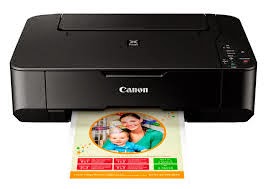
Supports Operating System for Resetter Canon MP237 Download :
- Mac OS X v10.8,
- Mac OS X v10.7)
- Mac OS (OS X v10.9,
- Linux
- Windows 8 and 8.1 (32bit, 64bit)
- Windows 7 (32bit, 64bit)
- Windows Vista (32bit, 64bit)
- Windows XP (32bit, 64bit)
- And Other Operating Systems
How to Install Resetter Canon MP237 Download :
- Have you downloaded the driver file by clicking the download link that we have prepared the following then save the file that has been downloaded to the folder you specified.
- Then you open the file that you downloaded from our website by clicking twice (EXE file), it will automatically start intalasi.
- Free Download Resetter Canon MP237 Download
How to Uninstall Resetter Canon MP237 Download :
- Select Control Panel On the Start menu, and then click Uninstall under this program and displays a page with a list of programs that you installed.
- In the program you want to uninstall Double-click the.
- Then click "Yes" and "OK" when you are asked, and the uninstall process to be completed.
Resetter Canon MP237 Download
Available link for download