Monday, March 20, 2017
Resetter Canon iP2770 Printer Free Download
Resetter Canon iP2770 Printer Free Download
 |
| Canon iP2770 |
Resetter Canon iP2770 Printer Free Download
This is how to reset Canon iP277
- Turn On your printer until you see Error Eo8 comes up, and you also see "The Ink Absorber is Almost Full" on your monitor.
- Prepare Resetter Canon Service Tool v3400 (can be downloaded by clicking the download link below)
- Make your printer in Service Mode. This is how to do it:
- Turn of the Error Printer by pushing POWER button, do not unplug the Power Cable
- Press and hold the STOP/RESET button together with POWER button
- Release STOP/RESET button but do not release POWER button
- While you are still pressing the POWER Button, Press STOP/RESET 6 times
- then release both of button (STOP/RESET and POWER Buttons) at the same time, then your printer will be in the Service Mode
- The computer will detect a new device/hardware, ignore it
- Then extract and run the Resetter Canon Service Tool v3400
- In the menu absorber clear ink counter Choose Main then click SET in the right side.
- In the menu ink absorber counter choose Main then click SET in the right side.
- Then click EEOPROM. then a printer will print a page.
- Youre done. the printer will works well.
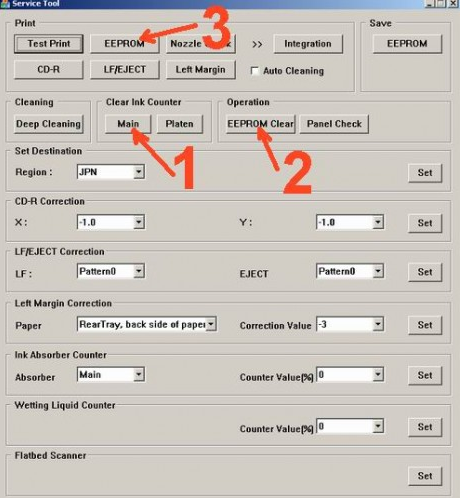
Resetter Canon iP277 Free Download link
Available link for download

Wednesday, February 22, 2017
Resetter Printer Canon Service tool v3400 Download Service Tool v3400 For Canon iP2770 MP258 MP287 MP237 and MG2570 Printer
Resetter Printer Canon Service tool v3400 Download Service Tool v3400 For Canon iP2770 MP258 MP287 MP237 and MG2570 Printer

- Hidupkan Printer, maka di panel LCD akan muncul error E08, dan ada keterangan "The Ink Absorber is Almost Full" pada layar monitor.
- Download Resetter Canon Service Tool v3400 di sini
- Printer harus dalam keadaan Service Mode. Caranya berikut ini
- Matikan Printer yang error E08 dengan menekan tombol POWER. Jangan cabut kabel power.
- Tekan dan Tahan tombol STOP/RESET diikuti dengan menekan Tombol POWER. Jadi kedua tombol posisi tertekan.
- Lepas tombol STOP/RESET tapi jangan lepas tombol POWER.
- Dalam keadaan tombol POWER masih tertekan, tekan tombol STOP/RESET sebanyak 6 kali.
- Kemudian lepaskan kedua tombol bersamaan. Maka Printer akan berada dalam kondisi Service Mode.
- LCD Panel akan blank / gelap dan di komputer anda akan mendeteksi hardware baru. Abaikan saja.
- Langkah selanjutnya Exctract dan Jalankan Service Tool v3400 yang sobat download tadi.
- Di menu absorber clear ink counter pilih Main kemudian klik SET di sebelah kanannya.
- Di menu ink absorber counter pilih Main kemudian klik SET di sebelah kanannya.
- Kemudian klik EEOPROM. maka printer akan cetak 1 halaman.
- Selesai. Printer Canon akan normal kembali.
- Printer dalam keadaan mati dan kabel listrik terpasang.
- Tekan tombol RESUME 2 detik kemudian tekan tombol POWER sampai lampu hijau nyala (saat menekan tombol POWER, tombol RESUME jagan dilepas dulu)
- Kemudian lepas tombol RESUME, tapi jangan lepas tombol POWER.
- Sambil tombol POWER masih tertekan, tekan tombol RESUME 6 kali. Led akan menyala bergantian orange hijau dengan nyala terakhir hijau. (jangan sampai keliru 4x karena printer akan mati total, tapi sifatnya sementara juga)
- Lepaskan kedua tombol bersamaan.
- Led akan blink sebentar kemudian akan nyala HIJAU.
- Komputer akan mendeteksi device baru, walaupun tidak sukses menginstall device barunya jadi abaikan saja …..
- Keadaan ini menunjukkan printer iP2770 dalam keadaan SERVICE MODE dan siap direset.
- Nah selanjutnya jalankan Software Resetter Canon Service Tools V3400 yang telah di download. tapi terlebih dahulu di extract.
- Di menu absorber Clear ink counter pilih Main kemudian klik SET di sebelah kanannya.
- Di menu ink absorber counter pilih Main kemudian klik SET di sebelah kanannya.
- Kemudian klik EEOPROM. maka printer akan cetak 1 halaman.
- Printer akan normal kembali. Kalau belum tanyakan.
Available link for download
Thursday, February 2, 2017
Reset printer canon ip2770
Reset printer canon ip2770

- Download
- Download
Available link for download
Sunday, January 15, 2017
 Available
 Tuesday, January 3, 2017
Service tool pixma ip2770 Resetter Pixma iP2270
Service tool pixma ip2770 Resetter Pixma iP2270
steps reset canon pixma iP22700:
- Log on to the service mode first connect the printer to the computer and the power cord without turning
on the printer (the printer is turned off).
- Press the Resume button about 2 seconds and then press the POWER button until the green light on
(when pressing the POWER button, Resume button jgn removed)
- Then off the RESUME button, but do not release the button POWER
- While the POWER button still depressed, press the Resume button 5 times. Led will light turns green to
orange last flame orange. (not to be mistaken 4x because the printer will die in total which means that the
steps we have to reinstall from scratch)
- Then release both buttons simultaneously, the LED will blink briefly then will flash GREEN.
- At this time the computer will detect a new device, just ignore it and wait until the process is complete.
- This situation shows the iP2770 printer is in a state of SERVICE MODE and ready to reset
for permanent service
1. Download Resetter
2. Exctract File Resetter iP2770.
2. Service Tool ServiceTool_V1050

3. Click the "MAIN", then the printer will proceed, then iP2770 will print one page
with the words "D = 000.0
4. Click "EEPROM Clear".
5. Then click "EEPROM", and the printer will print the results iP2770 Resetter. One line in his writings as
follows: "TPage (TTL = 00000)"
5. Turn off the printer by pressing the POWER button.
6. Up here if all goes well, its too printer will reset and is back Normal.
Available link for download
Saturday, December 24, 2016
Reset Printer Canon IP2770 Error 5B00 Waste Ink Tank Absorber Full
Reset Printer Canon IP2770 Error 5B00 Waste Ink Tank Absorber Full

.png)
.png)
.png)


1. bila masih tidak bisa bekerja software tersebut secara normal, pakai resetter terbaru disini kemudian jalankan Service Tool 3400.
3. Dikolom Ink absorber counter pilih Main kemudian klik SET di sebelah kanannya.
4. Dikolom Print klik EEPROM. Maka akan mencetak 1 halaman.
5. Coba matikan printer lalu nyalakan kembali.
Selamat printer anda sudah bisa digunakan kembali...
Download DRIVER Canon IP2770 disini.
Note :Bila software bekerja tetapi masih blink / software tidak bekerja maka ulangi mereset printer secara manual dilanjutkan mereset kembali.
Ingin simpan Tutorialnya?klik disini.
Terimakasih telah berkunjung keblog saya.
jangan lupa komentarnya ya.
Butuh Service Printer di Surabaya?di BAYUIDOCOM saja.
aman dan bergaransi.
Available link for download